
Editing on a branch #
Choose the working branch #
The project tree header contains the Branch selector next to the system selector. Options are all branches of the system that are not deleted.
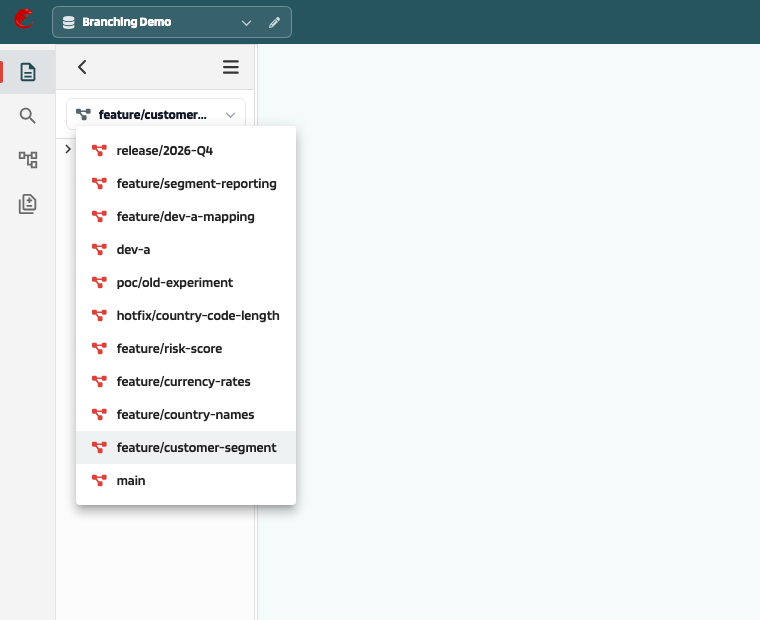
Selecting a branch:
- reloads the project tree from that branch
- makes element detail, edit, push, versions, dependencies, validation, and search work on that branch
- keeps a separate set of open tabs per system and branch
The choice is remembered per system in the browser. Set as active on the Branches page does the same. The branch is not part of the URL, so a shared link opens in the recipient’s own active branch.
Edit and push #
The standard Edit / Push cycle applies, scoped to the active branch:
- Edit locks the element on this branch and creates a draft from the element’s current content on the branch.
- Autosaved changes stay on this branch.
- Push creates a new version labelled
{branch}-{n}on this branch.
Other branches are not affected. The same element can be locked and edited on another branch at the same time.
On a protected branch, push is rejected with Direct changes are not allowed on protected branch […]; use a merge request instead. Locked and archived branches do not block edit and push yet; only relation changes are refused there.
Versions #
The Versions tab lists the history of the element on the active branch, including the version number label (for example main-42, feature/A-1). Restoring an old version creates a new version on the active branch.
Create, move, and delete elements #
- New elements exist only on the branch where they were created until they are merged.
- Moving an element in the tree is a branch change and appears in Compare and merge requests.
- Deleting an element on a branch marks it deleted on that branch only. Merging the branch removes it on the target.
Search and dependencies #
- Structure search in the left panel searches the active branch.
- Dependencies (relations) are kept per branch and copied when a branch is created.
- References between different systems are not branch-aware in the current build.
ODCS export #
Folder data contracts are available per branch (/v2/branch/{branchId}/folder/{id}/odcs). See
Data contract (ODCS).